
Trying to recover a bad flash on the Foxconn NF4UK8AA-8EKRS mobo, able to boot to a dos disk and tried the AFU860H flash utlility downloaded from the Foxconn site.
eg
AFU860H 49GW1P47.BIN /py/sn/cc/cd/cp/wb
Then loads flash into utility, informs me not to turn off computer, then fails, saying ROM write protected, check jumpers.
Have check all jumpers, still unable to write, I think though this chip can be protected via the CMOS setup options. I wonder therfore if the chip itself has been locked, its a 49LF004A.
If it is will I be able to use a flash utility such as Uniflash with the -UNLOCK option.
Foxconn NF4UK8AA-8EKRS BIOS Flashing
Ok, managed to flash it ok.
The BIOS is protected in the CMOS setup, which of course you cant get into to change, (even a CMOS reset or taking the battery out doesnt work)
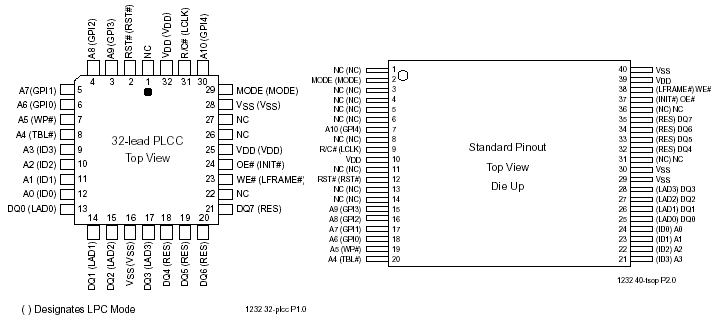
There are two pins, 7 and 8, on the SST 49LF004B device which are responsible for the protection, one of them was held low, the answer was to temperary short pins 7 and 8 together (Switch off first, I then soldered them), this will allow both pins to be high sufficient for the protection to be removed.
Flash the BIOS in the usual way.
Switch off and remove the short, All done, a working motherboard again!
The BIOS is protected in the CMOS setup, which of course you cant get into to change, (even a CMOS reset or taking the battery out doesnt work)
There are two pins, 7 and 8, on the SST 49LF004B device which are responsible for the protection, one of them was held low, the answer was to temperary short pins 7 and 8 together (Switch off first, I then soldered them), this will allow both pins to be high sufficient for the protection to be removed.
Flash the BIOS in the usual way.
Switch off and remove the short, All done, a working motherboard again!
Hi, I've got exactly the same problem, a badly flashed NF4UK8AA-8EKRS - been banging my head against it for a couple of days! Can you give me an idea of where that chip is and how to identify the right pins to short?
Any help much appreciated - really want to rescue the mobo if possible...
cheers,
seb
Any help much appreciated - really want to rescue the mobo if possible...
cheers,
seb
-
edwin
- The Hardware Archivist
- Posts: 6286
- Joined: Wed Mar 20, 2002 7:11 pm
- Location: Netherlands
- Contact:

see the battery (round silvery thing), bit to the right and down the silver square thing in the brown socket is the bios chip. pinout of the chip is here:
edwin/evasive
Do not assume anything
System error, strike any user to continue...
Do not assume anything
System error, strike any user to continue...
