
Free instant access to BIOS tips!
Fill in your name and email and receive our ebook 'How to update your PC BIOS in 3 easy steps' (15$ value), free BIOS tips and updates about Wim's BIOS!

Fast, Scalable and Secure Webhosting
Are you currently having hosting problems? Do you feel that your site slowlyness is killing sales or traffic?
Our book Fast, Scalable and Secure Webhosting for Web Developers will give you the knowledge to run your site on a speedy, scalable and secure server!
Start learning about Linux, Nginx, MariaDB, PHP-FPM, Java, IPv6, HTTPS, WordPress and much more!
Tip: Receive your free Chapter Secure your site with HTTPS by joining our mailing list!

Identify your motherboard with its BIOS ID
You can identify your motherboard using the BIOS ID which is displayed on most computers at bootup. The BIOS ID syntax differs between the different BIOS vendors: AMI, Award, Phoenix, ...
On this page we'll give you an summary overview of the different syntaxes used. Per BIOS vendor we have more detailed pages listing all BIOS IDs we have found for motherboards.
AMI (American Megatrends) BIOS syntax
In the screenshot below you can see where to find the BIOS ID during bootup:
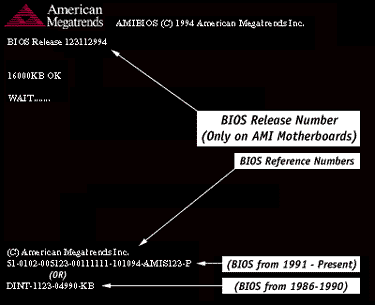
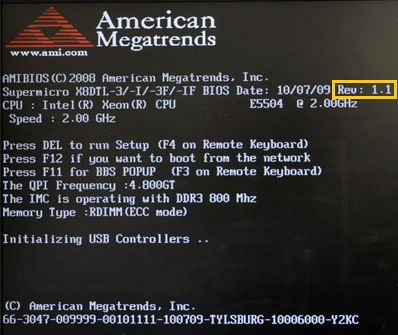
Two different syntaxes are used:
- AMI BIOS from 1986 - 1990: Example BIOS ID: DINT-1123-04990-K8
- AMI BIOS from 1991: Example BIOS ID: 51-0722-001169-00111111-071595-SIS5571-007_66_SIS5571
The bold sections in the BIOS ID identify the manufacturer of the motherboard, click here to Identify your AMI BIOS based motherboard based on the ID!
Award BIOS syntax
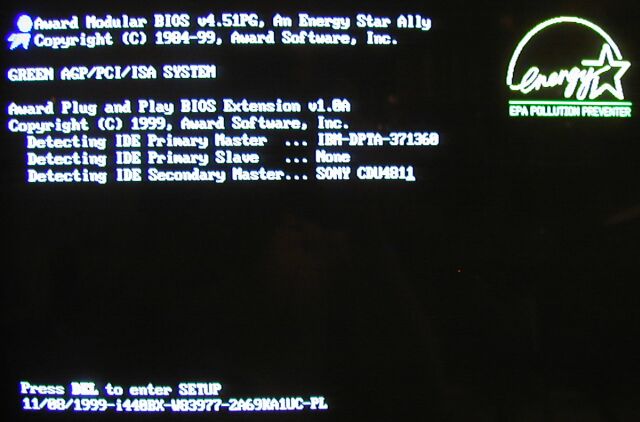
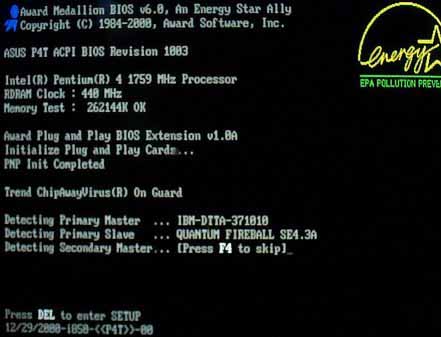
The syntax is as follows:
- 09/23/2003-i865PE-W83627-6A79AA1IC-11
To understand the structure of this Award BIOS ID, please visit our Award BIOS IDs page
Acer BIOS syntax
The syntax of Acer BIOS strings is as follows:
- ACR6BE00-M00-941005-R02-F0
- FUJ9CE00-M01-950724-R03-A1-F3
To understand the structure of this Acer BIOS ID, please visit our Acer BIOS IDs page
Intel AMI BIOS syntax
Intel motherboards have used AMI BIOS in the past. (besides Phoenix BIOSes).
The general layout of the BIOS identification string is 1.00.xx.XYaz, such as 1.00.xx.AZ0.
We have compiled the largest list of Intel AMI BIOS ids here.
Intel Phoenix BIOS syntax
Here is an example Intel Phoenix BIOS ID : SGP4510H.86A.0121.2009.0828.0117
To understand the structure of this Phoenix BIOS ID, please visit our Intel Phoenix BIOS IDs page
Need help? Ask your question here!
(Examples: how to update your BIOS, how to identify your motherboard)
About
My name is Wim Bervoets and I'm the founder of Wim's BIOS Page. The history of this site goes back to 1996 when I was taking my first steps on the internet. Gradually the site grew to what it is now - an authority site about BIOS update information - with an active forum.
Free instant access to BIOS tips!
Fill in your name and email and receive our ebook 'How to update your PC BIOS in 3 easy steps' (15$ value), free BIOS tips and updates about Wim's BIOS!
Recent updates



-
Added Medion BIOS Updates

Contact Us
Belgium, Europe
Email: [email protected]
Stay Connected
1996 - 2019 © Wim Bervoets. Privacy Policy | Terms of Service | Disclaimer | Disclosure