
Free instant access to BIOS tips!
Fill in your name and email and receive our ebook 'How to update your PC BIOS in 3 easy steps' (15$ value), free BIOS tips and updates about Wim's BIOS!
Fast, Scalable and Secure Webhosting
Are you currently having hosting problems? Do you feel that your site slowlyness is killing sales or traffic?
Our book Fast, Scalable and Secure Webhosting for Web Developers will give you the knowledge to run your site on a speedy, scalable and secure server!
Start learning about Linux, Nginx, MariaDB, PHP-FPM, Java, IPv6, HTTPS, WordPress and much more!
Tip: Receive your free Chapter Secure your site with HTTPS by joining our mailing list!

BIOS FAQ
Below we have compiled some of the most frequently asked BIOS questions. Looking for a way to update your BIOS? Follow the instructions in the automatic or manual BIOS update overview.
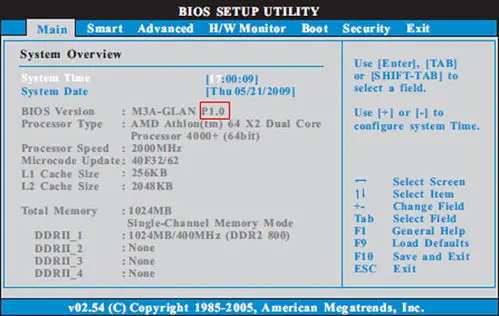
Manual BIOS update overview.
- Identify your motherboard manufacturer & model by looking up its BIOS ID (available for Award or AMI BIOS)
- Copy down your BIOS id string which appears at bootup EXACTLY!
- Compare your BIOS id string to the ones in our database to identify the manufacturer and model of your motherboard.
- Download the correct BIOS file from the manufacturer's home page via the BIOS Updates page.
- Download the appropriate flash program from the manufacturer's home page or the Utilities Page.
- Flash your BIOS.
BIOS Update Questions
- What is a (Flash) BIOS ?
- How can I determine what BIOS is on my PC and if there is an update?
- How to identify your motherboard manufacturer ?
- Do you really need a (Flash) BIOS upgrade ?
- How do you determine if your system has a Flash Bios chip ?
- Where can you download Flash BIOS upgrades ?
- How do I identify a motherboard with a Phoenix BIOS?
- What are the definitions of PROM, EPROM, EPROM Burner?
- What is the BIOS doing during the bootup sequence?
BIOS Flash Questions
- How do you flash your BIOS ?
- How to create a bootable USB memory stick ?
- How to make a bootable CD-ROM?
- How to generate a boot disk for updating a BIOS ?
- What to do when the Award flasher reports Insufficient memory
- What can go wrong when flashing a BIOS?
- What does "The program file's part number does not match with your system" mean?
- What can you do if your BIOS is buggy and their is no update available ?
- Why aren't there no Flash BIOS on the Award or AMI site ?
- My BIOS/Operating System doesn't recognize my 12GB/32GB/64GB/128GB hard disk
- How to flash an Intel AMI BIOS on an Intel OEM board ? (e.g. when you have BIOS 1.00.xx.CB0H and want to update to a 1.00.xx.CB0 BIOS)
- How to flash an Intel Phoenix BIOS on an Intel OEM board ?
- I flashed my VIA chipset based motherboard with the correct BIOS upgrade and it died. Why ?
BIOS Recovery
- How to recover a corrupt BIOS ?
- Where can I buy an EPROM programmer, empty BIOS chips and extraction tools?
- My motherboard (BIOS) is dead, and I can't get my floppy drive to work to do a boot-block flash.
BIOS Settings
- How to get into your computer BIOS?
- How can you clear your BIOS with the DOS DEBUG command ?
- How to get around the BIOS password protection?
- How do you get rid of IRQ Routing Table errors in Windows 95 98 ME?
- Why is there no option to enable USB in my BIOS setup?
- How to solve the AMI BIOS Beep codes ?
BIOS Tools
Other BIOS questions
- How to insert NCR SCSI BIOS v3.07 or 4.03 into your MRBIOS ?
- How can you change the EPA logo that is displayed at boot-up on Award BIOS based motherboards ?
- Why won't my Intel VX chipset based motherboard recognize xxMB DIMMS/SIMMS?
- My hard drive has a size of xxGB. Why is only xxGB reported?
- How to fix hangs on verifying dmi pool when booting up you PC?
Need help? Ask your question here!
(Examples: how to update your BIOS, how to identify your motherboard)
About
My name is Wim Bervoets and I'm the founder of Wim's BIOS Page. The history of this site goes back to 1996 when I was taking my first steps on the internet. Gradually the site grew to what it is now - an authority site about BIOS update information - with an active forum.
Free instant access to BIOS tips!
Fill in your name and email and receive our ebook 'How to update your PC BIOS in 3 easy steps' (15$ value), free BIOS tips and updates about Wim's BIOS!
Recent updates



-
Added Medion BIOS Updates

1996 - 2019 © Wim Bervoets. Privacy Policy | Terms of Service | Disclaimer | Disclosure
